Agent
Agents are how the platform turns awareness into action. Each agent represents a remote AI worker - a specific workflow, decision engine, or orchestration service - that can be invoked safely when the context calls for it. Agents sit alongside roles, characters, MCPs, assets, and collections as first-class Core Objects in the synthesis engine.
Where MCPs expose tools, agents encapsulate behavior. They're typically responsible for multi-step workflows across systems: submitting a case, reconciling data between apps, triggering physical processes, or coordinating other services via an A2A (agent-to-agent) protocol. Many services offer agent builders such as zapier, n8n, OpenAI, and many others.
How Agents Fit
Within the Core Objects model, agents are defined with:
- A concrete endpoint (
agent_uri) that the platform can call. - Authentication details (
auth_type,auth_uri) so calls are governed and auditable. - Role permissions (
agent_permission_map) that determine who can use the agent. - Optional initialization parameters (
init_parameters) that tune the agent to a particular use case or environment. - A guidelet to help the LLM understand how to typically interact with the agent. These are especially useful when using an orchestration framework and having sub-agents interact with subsets of tools and remote agents.
Agents are then bound into context through assets and collections:
- Assets (e.g., a specific machine, patient, or client) can have one or more agents bound directly to them, with initialization values that tailor the agent for that exact asset.
- Collections (e.g., zones, rooms, workcells) can bind agents for that space, so anyone operating in that zone automatically gets the right intelligence.
Binding rules control how those agents propagate through the knowledge graph: which agents "flow up" from assets into collections, which masks apply, and how far that propagation can go. This keeps control and safety built into the structure rather than bolted on later.
During Assembly, the platform traverses the graph for a specific role × collection, gathers the allowed MCP tools and agents, applies masks and permissions, and produces a signed mim_assembly. That assembly contains the full map of which agents are available, with which scopes, for that moment in time - and the logging layer captures every decision along the way for downstream audit and replay.
Agent Config Model
The AgentConfig schema defines how an agent is represented in configuration, APIs, and in the Bifrost admin tool:
AgentConfig {
  agent_id: string
  name?: string
  description?: string
  guidelet?: string
  role_permissions?: { [key: string]: "Allow" | "Deny" }
  init_parameters?: object
  agent_permission_map?: { string[] }
  agent_uri?: string
  auth_type?: string
  auth_uri?: string
  created_at?: number
  updated_at?: number
  customer_id?: string
}
Field-by-field:
agent_id: string
Stable identifier used across the platform (assemblies, bindings, logs). This is what Binding Rules and downstream systems reference.
name?: string
Human-readable label shown in Bifrost and in logs. Use clear, task-oriented names: "Pharmacy Agent" or "Line Downtime Triage Agent".
description?: string
Short explanation of what the agent does and where it should be used. This is primarily for administrative clarity.
guidelet?: string
Optional guidance string that explains how to work with the agent - for example, when to call it, expected inputs, or constraints. Think of this along the lines of a Claude Skill made available when the agent is included in the assembly.
role_permissions?: { [key: string]: "Allow" | "Deny" }
A map of role_id → "Allow" | "Deny", acting as a master switch for which roles can access the agent at all. This works in concert with Binding Rules and masks: even if the agent flows into an assembly via bindings, it won't be callable for a role that's set to "Deny".
init_parameters?: object
Default configuration payload sent to the agent on initialization or call. Examples:
- Default queue or region.
- Feature flags for that customer.
- Static identifiers (e.g., "this agent always operates for facility X unless overridden by bindings").
Asset- and collection-level bindings can further refine or override these values to make the same agent behave differently per context.
agent_permission_map?: { string[] }
A structured map for fine-grained permissions associated with the agent. This is a list of strings siimilar to the MCP tool_permission_map field for a single tool. The {resource} placeholder will be replaced with the resource name later.
agent_uri?: string
Canonical endpoint for the agent.
auth_type?: string and auth_uri?: string
Together, these describe how the platform authenticates when calling the agent:
auth_typecould represent mechanisms likeoauth2,jwt, orapi_key.auth_uriindicates where tokens/credentials are obtained or validated.
created_at?: number, updated_at?: number, customer_id?: string
Operational metadata managed by the platform rather than edited manually.
Managing agents in the Bifrost admin tool
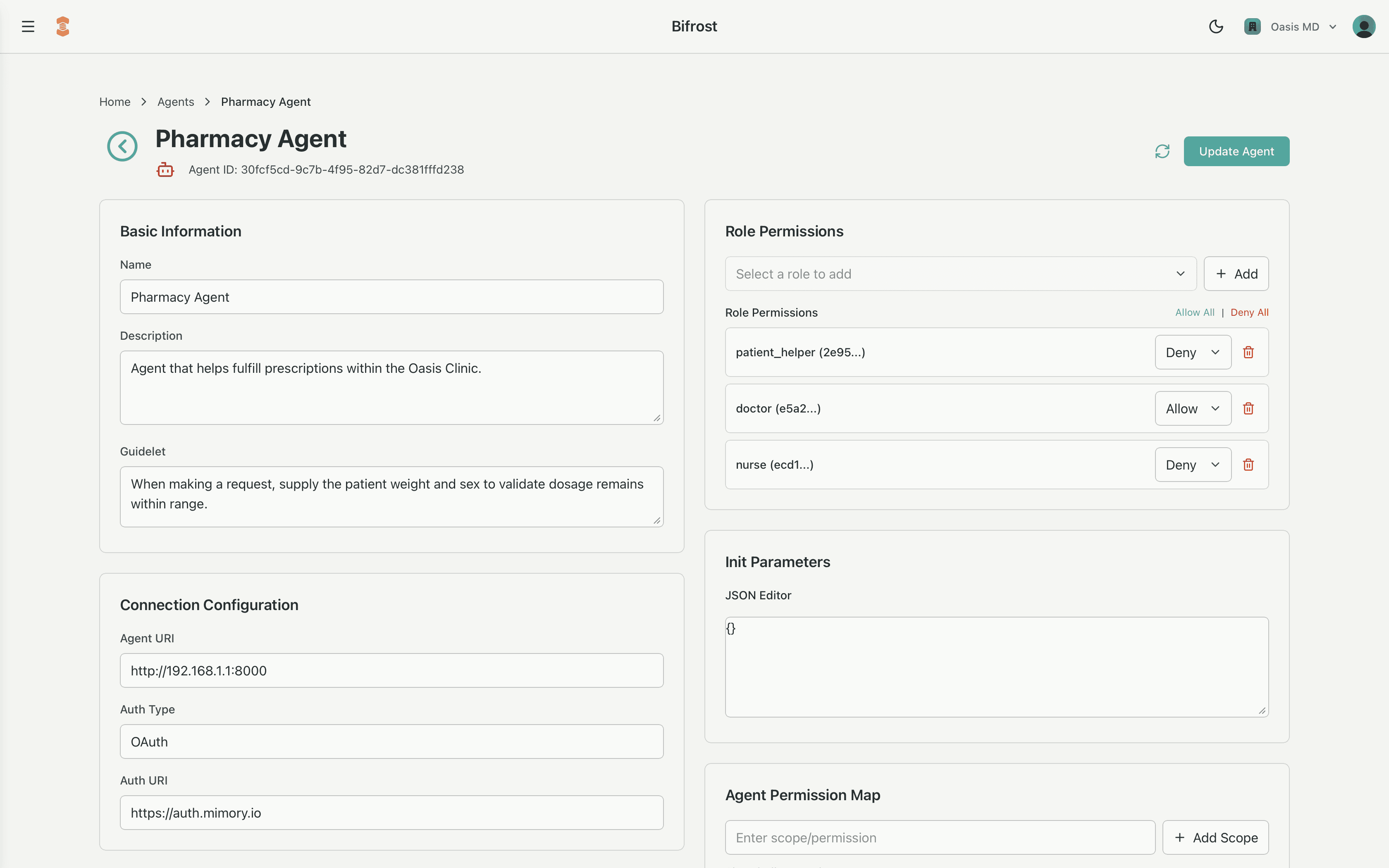
Administrators use the Bifrost admin tool to create, update, and review agents without touching raw JSON:
- The Agents screen lists all agents for a customer, including their names, status, and last updated time.
- Creating or editing an agent opens a form that maps directly to
AgentConfig:- Basic details:
name,description,guidelet - Endpoint & auth:
agent_uri,auth_type,auth_uri - Permissions:
role_permissionsandagent_permission_map - Configuration:
init_parametersas a structured JSON editor
- Basic details:
When to create a new agent
Create a new agent when you need:
- A distinct workflow or orchestration that can evolve independently (e.g., "maintenance scheduling" vs "incident triage").
- A separate trust boundary or auth configuration (different
auth_typeor scopes).
Reuse an existing agent when you only need different parameters or bindings. In that case:
- Keep one agent definition (
agent_idstays the same). - Use
init_parametersand binding-level overrides to specialize behavior per asset, collection, or customer.
This keeps your agent catalog focused and governed, while allowing the synthesis engine to assemble exactly the right capabilities for each role in each space - intelligence that understands the moment, and acts safely within it.