MCP
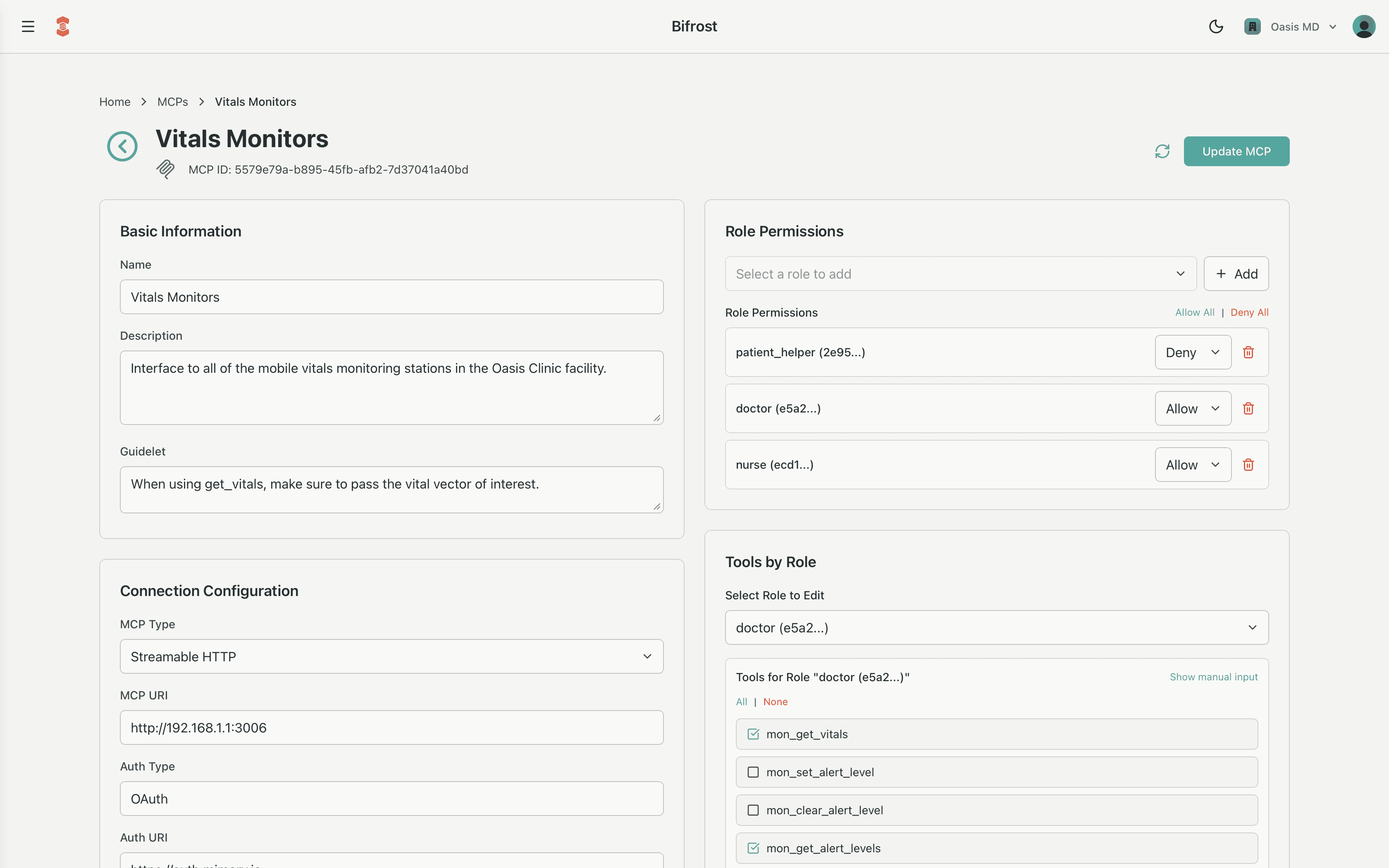
Model Context Protocol (MCP) configurations describe how the platform safely connects copilots to real systems: tools and APIs. An MCP defines what the AI is allowed to do, where it can do it, and who is allowed to use it, so that every interaction stays grounded in context.
At runtime, the synthesis engine assembles MCPs, agents, characters, assets, and collections into a single, signed assembly that describes exactly what a given role can access in a given context.
MCP Config Model
The MCPConfig schema defines how an MCP is represented in configuration, APIs, and in the Bifrost admin tool:
MCPConfig {
  mcp_id: string (required)
  name?: string
  description?: string
  guidelet?: string
  mcp_type?: "streamableHTTP" | "SSE" | "stdio"
  mcp_uri?: string
  auth_type?: string
  auth_uri?: string
  masks?: { [key: string]: string[] }
  tool_permission_map?: { [key: string]: string[] }
  role_permissions?: { [key: string]: "Allow" | "Deny" }
  tools?: { [key: string]: string[] }
  parameters?: { [key: string]: string[] }
  created_at?: number
  updated_at?: number
  customer_id?: string
}
System
mcp_id: string (required)
UUID for the MCP. Assigned by the platform and cannot be changed.
name?: string
Name for the MCP for display and search purposes.
description?: string
Description for the MCP and its general purpose.
mcp_type?: "streamableHTTP" | "SSE" | "stdio"
The communication protocol type used to connect to the MCP server. streamableHTTP uses standard HTTP requests, SSE uses Server-Sent Events for streaming responses, and stdio uses standard input/output for local communication. For most use cases, streamableHTTP is the default and most appropriate choice.
mcp_uri?: string
The endpoint URI where the MCP server is located. This is the base URL or connection string used to communicate with the MCP service.
auth_type?: string
How the platform authenticates when connecting to the MCP server (for example, "oauth2", "api_key", "jwt", etc.). This ties into the broader authorization and scope model so that every call can be traced and audited.
auth_uri?: string
The URI used to obtain or refresh credentials when auth_type requires a flow (e.g., OAuth token endpoint). This keeps security flows explicit and explainable.
created_at?: number / updated_at?: number
Timestamps for governance and change history.
customer_id?: string
Metadata used by Mimory. Not modifiable.
Tools, Scopes, and Masks
Tools are the individual capabilities an MCP exposes to the AI: API calls, database operations, actions in third-party systems, or even entire remote workflows.
In Bifrost → MCP → Tools & Scopes, you define three related concepts:
tool_permission_map
tool_permission_map declares the full set of tools this MCP knows about and the authorization scopes required to call each tool.
"tool_permission_map": {
  "getPatientRecord": ["ehr.read.{fragment}"],
  "updatePatientAllergies": ["ehr.write.{fragment}"],
  "listAppointments": ["ehr.read.schedule"]
}- Keys are tool identifiers the LLM can call.
- Values are the OAuth scopes or permissions needed to run that tool.
{fragment}is a placeholder that will later be replaced by more specific scope fragments from bindings (e.g.,s0034for a particular sensor or patient).
masks
MCPs often support many tools, but a given situation only needs a focused subset. Masks are named filters that carve out those subsets.
"masks": {
  "read_only": ["getPatientRecord", "listAppointments"],
  "allergies_admin": ["getPatientRecord", "updatePatientAllergies"]
}- Each mask name maps to a list of tools.
- Masks are applied by MCPBindings and binding rules to narrow what flows up through the graph.
- Multiple masks can be combined; the effective tool set is the intersection of:
- tools allowed by the MCP for a role,
- tools included in the selected masks,
- tools that survive binding rules across assets and collections.
Parameters
Parameters narrow where and how a tool can act. They define allowed value sets for tool inputs, especially sensitive identifiers or resource selectors.
"parameters": {
  "patient_id": ["P12345", "P67890"],
  "line_sensor_id": ["s0034", "s0035"]
}
Each entry:
- Uses a parameter name (e.g.,
patient_id,line_sensor_id) as the key. - Lists the allowed values for that parameter within this MCP.
- Is expressed as strings at the MCP layer so that bindings can refine or override them later.
- Typically an MCP definition does not have default values for the parameters. Instead the lists are left empty and only populated later through MCPBindings to assets and collections.
Typical uses:
- Regulatory boundaries – limit
patient_idto a subset tied to a unit, shift, or consent. - Operational focus – limit
line_sensor_idto sensors in a given cell or line.
In Bifrost, the Parameters section lets you add parameter names and initial values (optional) that will be narrowed by MCPBindings at the asset or collection level.
Roles and Tools
Roles describe who is acting. In the broader architecture, roles are a core object (e.g., operator, technician, nurse, doctor) and synthesis always happens for exactly one role at a time.
MCPs plug into this model with two fields: role_permissions and tools.
role_permissions
role_permissions is a coarse but powerful gate:
"role_permissions": {
  "nurse": "Allow",
  "doctor": "Allow",
  "patient_advocate": "Deny"
}"Allow"means this role can use this MCP subject to tools, masks, and bindings."Deny"means this role cannot access this MCP at all, regardless of other configuration.
It's the first line of control: if a role doesn't belong near a system, you don't expose the MCP at all.
tools
The tools map then refines what an allowed role can actually do:
"tools": {
  "nurse": ["getPatientRecord", "listAppointments"],
  "doctor": ["getPatientRecord", "updatePatientAllergies", "listAppointments"]
}
Together with role_permissions, masks, and binding rules, this produces a finely tuned, understandable policy:
role_permissions: Is this MCP even visible to the role?tools[role]: Which tools are conceptually appropriate?masks and bindings: Which of those tools are in scope for this asset, collection, or relationship?
In Bifrost, the Roles & Tools section usually allows:
- Selecting roles for the MCP.
- Choosing which tools each role can see.
Guidelets
guidelet are composable context on top of the raw configuration. It's a place to encode how the tools in this MCP should be used and what the AI should prioritize when it calls these tools. These should be short and focused, similar to a Claude Skill, and are especially useful when using sub-agents.
Guidelets give you a mechanism to add to the system prompt to make interaction with this MCP more robust and reliable.
How Bifrost Brings It Together
When you configure an MCP in Bifrost, you're essentially answering four questions:
- What system is this?
mcp_type,mcp_uri,auth_type,auth_uri
- What can it do, and under which scopes?
tool_permission_map,masks
- Who can use it, and with which tools?
role_permissions,tools
- Where and how should it act?
parameters, plus later bindings and scope fragmentsguideletto steer behavior and expectations
The result is an MCPConfig that slots cleanly into the broader assembly process, so that every copilot session is aware of the moment, governed by design, and traceable end-to-end.