Asset
Assets represent the things in the world your intelligence is acting on - the equipment, clients, projects, and trackable objects that give every interaction concrete context.
It typically represents something you'd track with an RTLS tag or a similar identifier, such as:
- A piece of equipment (ventilator, pump, conveyor sensor)
- A client or patient (for customer- or person-centric workflows)
- A more generic asset that doesn't fit those two but you still need to bind tools and agents to
Assets are where context and control meet:
- Context: The asset tells the system which specific thing we're talking about.
- Control: The bindings attached to that asset determine exactly which tools, scopes, and agents are allowed to act on it.
When the platform assembles an agent for a given role and space, it walks the binding graph and pulls in all the MCPs, agents, parameters, and OAuth scopes associated with the relevant Assets.
Asset Config Model
The base configuration for an asset is:
AssetConfig {
  asset_id: string
  asset_type: "asset" | "client" | "equipment"
  rtls_id?: string
  name?: string
  description?: string
  serial_number?: string
  created_at?: number
  updated_at?: number
  customer_id?: string
}
Field-by-field:
asset_id: string
Stable identifier for the asset. This is the primary key used throughout the system to refer to the object.
asset_type: "asset" | "client" | "equipment"
High-level classification that determines how the asset is used:
"equipment"– Physical devices, machinery, sensors, etc."client"– People or organizations the system serves (patients, customers, tenants)."asset"– Generic catch-all when the above don't fit.
rtls_id?: string
Identifier from your RTLS or location tracking system. This connects the asset to real-time movement events and zone changes (e.g., moving a pump from ICU to Step-Down).
name?: string
Human-readable name shown in the Bifrost UI and logs, e.g., ICU Pump 0034 or Patient – Maria S.
description?: string
Optional free-text description for extra clarity: model details, clinical notes, or operational hints.
serial_number?: string
Hardware or system serial number. Useful when aligning Bifrost with CMMS, EHR, ERP, or inventory databases. Only visible in Bifrost for 'equipment' type.
created_at?: number, updated_at?: number
Timestamps for lifecycle auditing. These support traceability when investigating.
customer_id?: string
Metadata used by Mimory.
Together, these fields make every asset both machine-addressable and human-legible, which is crucial for explainable logs and audits later.
Binding MCPs and Agents to Assets
An asset becomes operational when you bind tools (MCPs) and remote agents to it. This is where you turn an abstract pump into this pump with these controls and only these scopes.
MCP bindings
class MCPBinding(BaseModel):
    mcp_id: str
    mask: str
    parameter_overrides: Optional[Dict[str, List[str]]]
    resource_scope_fragments: Optional[List[str]]
For a given asset, each MCPBinding answers three questions:
- Which MCP?
mcp_ididentifies the tool collection to attach (e.g.,factory_line_mcporehr_patient_tools). - Which tools within that MCP?
maskfilters the MCP's tool set down to the subset that makes sense for this asset.- In many cases, the mask will be a broad all mask for equipment-level assets.
- In specialized cases (e.g., a camera inside a larger inspection armature), the mask can narrow to just the relevant tools.
- Which parameters and scopes?
parameter_overridespins tool parameters to asset-specific values. For example:sensor_id=["sensor0034"]patient_id=["12345678"]
resource_scope_fragmentsprovides the OAuth resource fragments for this asset (e.g.,["sensor:s0034"]). Combined with customer-level scopes, they produce the final scope list requested from the authorization system.
This is a concrete expression of governed context: the tools know which thing to touch, and the scopes know how far they're allowed to reach.
Agent bindings
class AgentBinding(BaseModel):
    agent_id: str
    parameter_overrides: Optional[Dict[str, Any]]
    resource_scope_fragments: Optional[List[str]]
Where MCP bindings expose tools, agent bindings attach remote AI driven workflows.
For example:
- A maintenance agent bound to a pump asset, with parameters like:
default_device_id = "pump_0034"maintenance_playbook = "icu_pump_standard"
- A billing or outreach agent bound to a client asset, scoped to that person's records only.
Just like MCP bindings, agent bindings use parameter_overrides and resource_scope_fragments to keep actions tightly scoped and auditable.
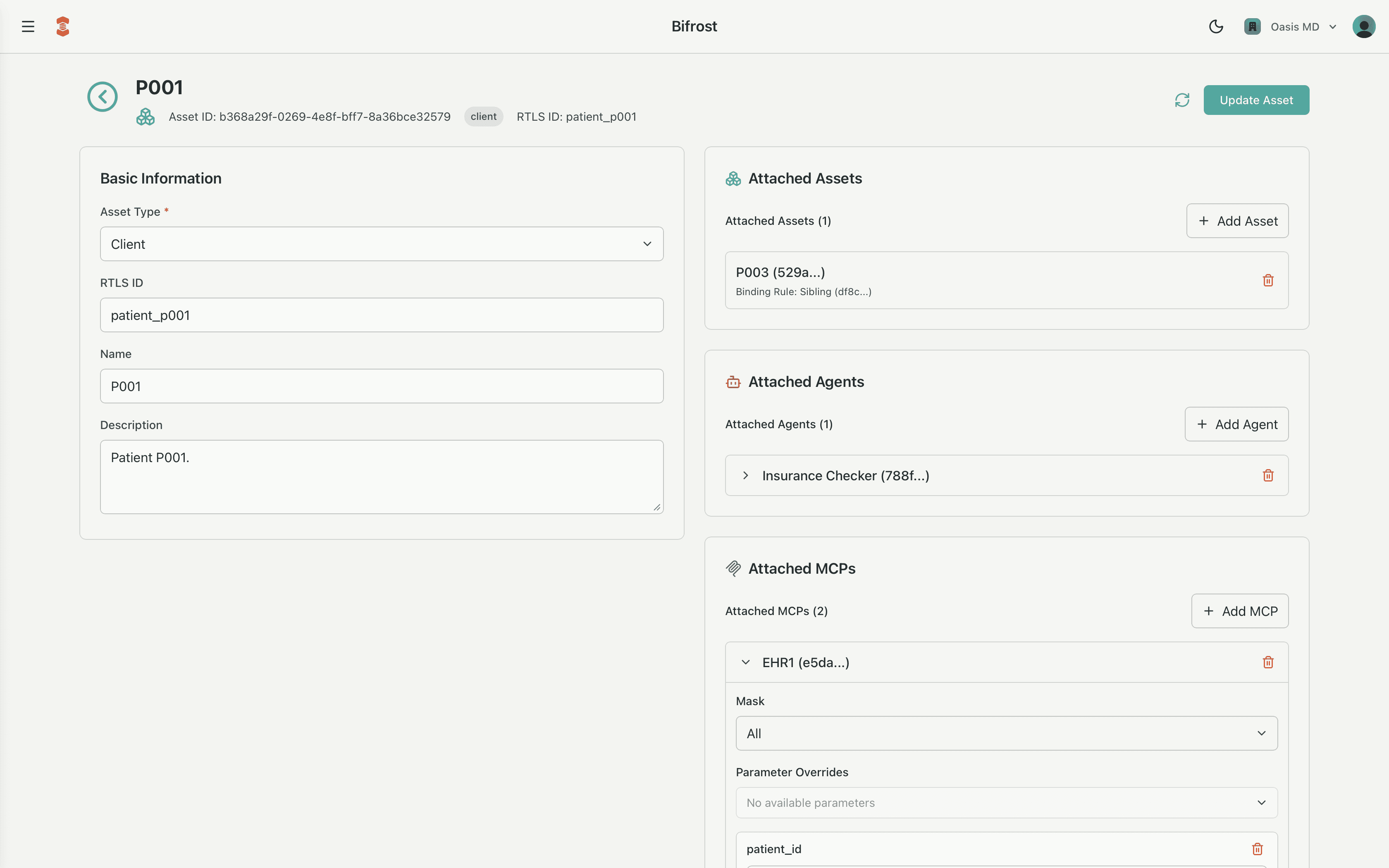
Managing Assets in the Bifrost Admin Tool
The Bifrost admin tool is where you create, inspect, and modify assets and their bindings.
In the assets section of Bifrost:
- The assets table shows key fields at a glance:
name,asset_type,rtls_id,serial_number,updated_at.
- Selecting an asset opens a detail panel where you can:
- Edit basic metadata (name, description, serial number).
- Attach or update MCP bindings:
- Choose an
mcp_id - Set the
mask(or use an "all tools" default where appropriate) - Configure
parameter_overridesandresource_scope_fragments
- Choose an
- Attach or update Agent bindings in the same way.
Typical workflows in Bifrost:
- Onboard a new device
Create anequipmentasset, assignrtls_idandserial_number, then attach the appropriate MCP with sensor-specific parameters and scope fragments. - Register a new client or patient
Create aclientasset, link it to the customer/tenant, then bind EHR/CRM MCPs and any specialized agents that should operate on that person's data. - Evolve controls safely
When requirements change, you adjust the bindings, not the code: update masks, tighten scope fragments, or change parameter overrides. Every change is tracked viaupdated_atand visible in logs.
By centralizing asset creation and bindings in Bifrost, you get:
- Clear separation between logical objects (assets) and operational behavior (MCPs and agents).
- Fine-grained, explainable control over what each agent can do, for whom, and where.
- A consistent way to scale contextual intelligence across equipment, clients, and environments without losing governance or clarity.
Assets can also be added and updated through the Bridge API. This allows for closer creation and update integration with your ERP, EHR, and other administrative tools.