Collection
Collections describe the places where context comes together - the spaces, zones, and logical groupings where people, assets, tools, and agents need to work in sync. They're the anchor point for what's happening here, right now, so the platform can assemble exactly the right capabilities for a given role in a given place.
In the object model, collections sit one level above individual assets and represent the spaces people actually work in: lines, rooms, bays, care areas, project cells.
- Assets describe specific things: a pump, a camera, a sensor, a patient, a work order.
- Collections describe where those things are or how they are grouped when doing work.
- Binding rules define how assets and collections relate, and what can propagate from one to the other (tools, agents, scopes, parameters, etc.).
- During assembly, the system starts from a
(role × collection)pair and walks the graph to gather MCP tools, agents, parameters, and OAuth scopes that should be active for this moment. The collection is the root context for that traversal.
Conceptually, a collection can be thought of as:
Collection Config Model
A collection is represented by the CollectionConfig schema:
CollectionConfig {
  collection_id: string
  collection_type: "zone" | "collection"
  zone_id?: string
  facility_id?: string
  name?: string
  description?: string
  created_at?: number
  updated_at?: number
  customer_id?: string
}
Field-by-Field:
collection_id: string
Stable identifier used across the platform. Generated and controlled by the platform.
collection_type: "zone" | "collection"
Distinguishes between:
"zone"– a space tied to RTLS or other sensing (e.g., "OR #3", "Line 4 Zone A")."collection"– a more abstract or logical grouping (e.g., "Sterile Core Assets", "Project Alpha Stations").
zone_id?: string
The RTLS zone_id for the collection. Only available in Bifrost when collection_type is set to zone.
facility_id?: string
The facility UUID in which the collection is located.
name?: string
Human readable label for the collection. This is typically something like Urgent Care Room 212.
description?: string
Further detail about the collection and it's purpose that helps track what a specific collection is for.
created_at?: number, updated_at?: number
Epoch timestamps for the when the collection was created and the last time it was modified.
customer_id?: string
Metadata used by and controlled by Mimory.
Lifecycle: Bifrost for Definition, Bridge for Motion
Collections follow a simple lifecycle:
1. Initial definition in Bifrost
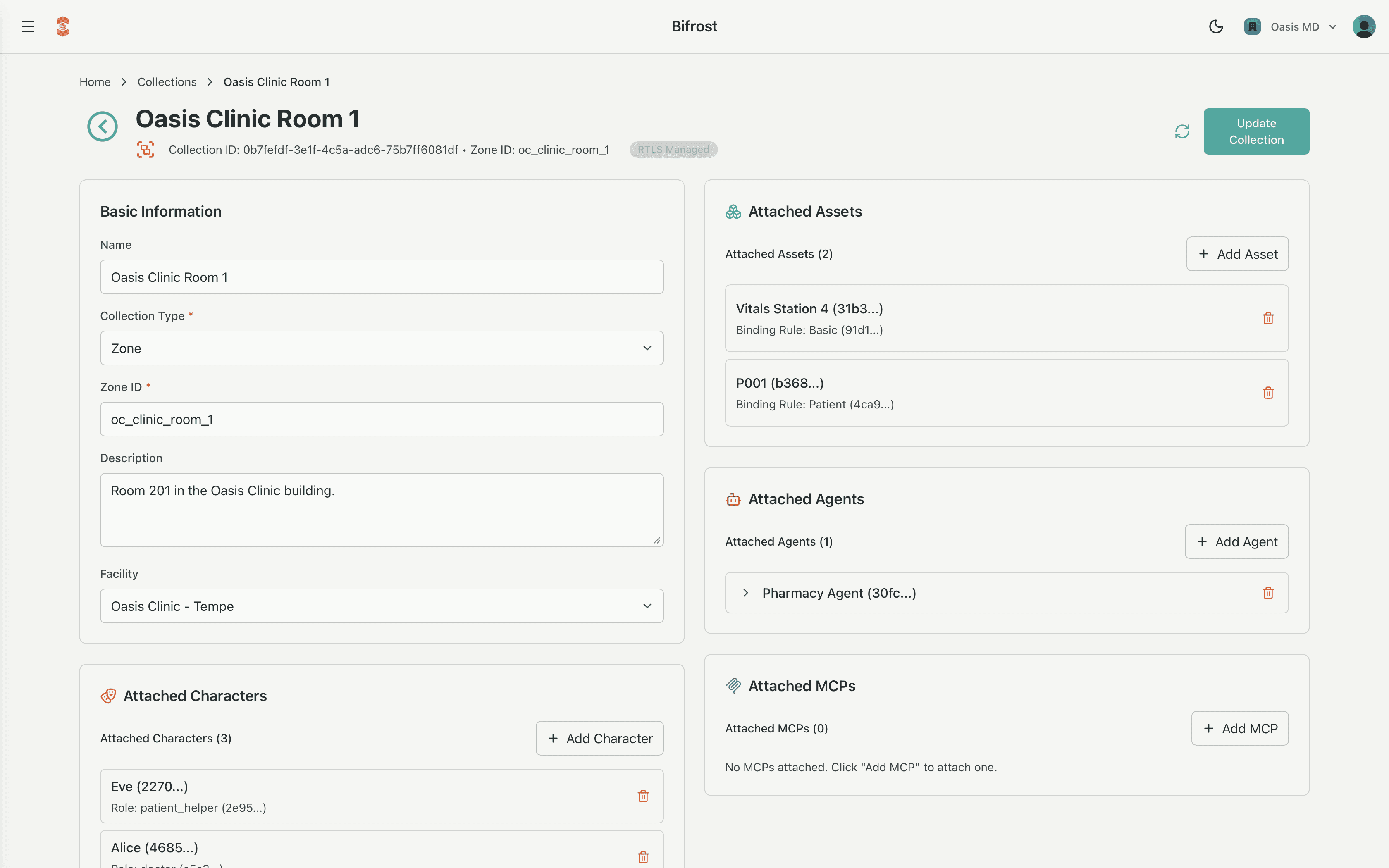
Collections are typically created and configured in the Bifrost tool:
- Choose the
collection_type("zone"or"collection"). - Link to the appropriate
facility_idand optionally azone_idfrom your RTLS or location system. - Give it a clear
nameanddescriptionthat match how people talk about the space. - Optionally pre-bind MCPs and agents.
This is usually a design activity: you're defining the spaces the platform will understand, not responding to live movement yet.
The Bridge API allows for the direct creations collections as well. This provides an integration path between your other administrative tools to directly create collections without requiring use of the Bifrost tool.
2. Ongoing interactions through the Bridge API
Once Collections exist, almost all runtime activity flows through the Bridge API, which manages how Assets relate to Collections:
attach– associate an asset, MCP, agent, or character with a collection (e.g., a mobile pump enters OR #3).detach– remove that association (e.g., the pump leaves OR #3).modify- modify the existing association between an asset, MCP, or agent with the collection.move_asset– efficiently update an asset relationship from one collection to another (e.g., a patient moves from "Waiting Area" to "Exam Room 2").
These operations are typically driven by:
- RTLS events (badges, tags, sensors).
- Workflow or ERP events (a work order is reassigned; a case moves stages).
- Direct integrations from external systems.
Every attach/detach/move is logged so that the platform can reconstruct exactly why a given assembly had access to a particular asset or tool at any point in time.
Binding MCPs and Agents to Collections
Collections aren't just containers for assets; they also define which tools and agents are native to a space.
This is modeled via MCP bindings and Agent bindings.
MCPBinding
class MCPBinding(BaseModel):
    mcp_id: str
    mask: str
    parameter_overrides: Optional[Dict[str, List[str]]]
    resource_scope_fragments: Optional[List[str]]
An MCPBinding on a collection lets you:
- Select the MCP (
mcp_id) that should be available in this space (e.g., "EHR", "ERP"). - Filter tools with a mask (
mask), so that only the subset relevant to this collection is visible to the LLM (e.g., "Painting Line Tools", "Emergency Room Patient Tools").- Example: On the same MCP, "Packaging Line Zone A" might expose only packaging tools, while "Inspection Cell" exposes inspection tools.
- Constrain parameters (
parameter_overrides) to collection-specific values:- Example: limit a
line_idorstation_idparameter to["line_004", "station_A3"]for all tools in this zone.
- Example: limit a
- Add OAuth scope fragments (
resource_scope_fragments) that represent this collection's resources:- These fragments are combined with customer-wide OAuth chunks to form the final scope list requested at runtime, keeping access tight and explainable.
AgentBinding
class AgentBinding(BaseModel):
    agent_id: str
    parameter_overrides: Optional[Dict[str, Any]]
    resource_scope_fragments: Optional[List[str]]
An AgentBinding on a collection configures remote agents that should be active in that space:
agent_idpoints to another AI agent reachable over A2A (e.g., a "Quality Deviation Workflow" agent or a "Bed Management" agent).parameter_overridescan pre-fill required config for that space (e.g.,{"workflow_id": "deviation_line4"}).resource_scope_fragmentsdeclare which resources this agent is allowed to operate on for this collection, contributing to the overall OAuth picture.
During assembly for a given (role × collection):
- The system walks the graph from the collection, across its assets and binding rules.
- For each collection and asset encountered, MCPBindings and AgentBindings are collected.
- Masks, parameter overrides, and scope fragments are applied and merged, with binding rules acting as filters and depth limits.
- The result is a
mim_assembly: the precise set of tools, agents, parameters, and scopes that are allowed here and now.
Collections vs. Assets: How They Work Together
While both assets and collections can have bindings, they play different roles:
Assets:
- Capture fine-grained specificity - "this exact sensor", "this particular patient".
- Usually introduce concrete identifiers and scope fragments (
sensor0034,patient_id=1234).
Collections:
- Capture shared context - "everyone in this room", "everything on this line".
- Provide a stable anchor for:
- Common tools (MCPs) that belong to the space.
- Workflows (agents) that run within that space.
- Groups of assets attached/detached over time.